Showing posts with label Breaking News. Show all posts

10 Ways That Man Gain Confidence

We all want to become more confident and feel good about ourselves so we can live our very best life. Most highly successful people are known to be confident. They know the art of gaining confidence and the importance of improving their self confidence in the face of obstacles. How to gain this confidence and joining the league of successful people is not difficult. The key to this self confidence is to be true to yourself and your capabilities. Knowing how to be confident is an important skill and mastering this art will help you succeed in life. Following are tips on how you can gain confidence and improve your self image:

  • Understand your capabilities and strengths: Take time out to think about whom you are, what you believe in and what is important to you. Evaluate your capabilities and strengths. Decide what you want from life.
  • Accept who you are: Have the courage to accept yourself as you really are even though you are not what someone else thinks or wants you to be. Believe in yourself that you are a pretty good person. You have your own talents, skills and abilities that make you extraordinary.
  • Develop a sense of control: When you feel very much in control of yourself and your life, you will feel confident enough to do and say things that match with your values and aspirations. Establish a sense of direction based on your behavior and always aim at objectives.
  • Do something you enjoy: Engage yourself in activities that you enjoy doing or playing like writing or painting. You can also try learning something new that you always wanted to do. Once you master things you enjoy, you will feel competent and capable.
  • Relax: Learning to become more relaxed is very important in life. People who are more relaxed have fewer memory problems and are prepared to face obstacles in life. You can relax by practicing meditation techniques including Tai Chi.
  • Positive people and thoughts: Surround yourself with people who are confident and caring. Wash out negative thoughts from your mind. Negative relationships drain energy from your body and create situations in which you lose your self esteem.
  • Make a list of your accomplishments: Value whatever you achieve in life. An accomplishment however small it is, is still an accomplishment.
  • Be true and honest to yourself: Being true to yourself means knowing exactly what you want and having a plan to achieve it. Self-confidence comes when you know that you have the capacity to get what you want in life.
  • Do not fear failure: It is extremely important to remember that if you predetermine that you are bound to fail, then you will. Instead of being preoccupied with the fear of failure and loss, as most people are, concentrate on opportunity and achievement.
  • Write out your thoughts: Maintain a journal and write down all things you want to do and accomplish. Take notice of day to day achievements and failures and think of possible reasons for them too. When you pen down your achievements and failures, you get into writing the thoughts that affect your self confidence throughout the day.
People are not born with good self-confidence. Most of us have to work at it. Eventually it will develop from your thinking and the things you do daily to make yourself feel good.

How to Setup StumbleUpon Paid Discovery Ad Campaigns

StumbleUpon Paid DiscoveryStumbleUpon has always been one of the best ways to bring in huge amount of traffic to your blogs, which is why most webmasters would use this service and share their articles or stumble the same. If you are someone who does not have the time to manage everything then the Paid Discovery option can come to the rescue. The service is available here in three different plans as listed below.
StumbleUpon Plans Pricing
The Plans are set in such a way that a normal website owner who is seeking can go for the Light option while someone who is looking for completely targeted traffic like e-commerce business can opt for premium plan.
Light
  • Target by interest, location and demographics
  • Basic reporting
  • Integration with Google Analytics
Standard
  • Priority serving in content streams
  • Target by interest, location and demographics
  • Advanced targeting by device (web or mobile)
  • Advanced reporting includes robust site performance and visitor data, traffic analysis and website quality score.
  • Integration with Google Analytics
Premium
  • Guaranteed top serving priority in content streams
  • Standard campaign targeting options
  • Standard advanced reporting
  • Integration with Google Analytics
In order to give a try i will go ahead with the Light plan where the cost would be 5 cents/visitor which is quite cheap considering the target traffic can be selected. To get started you need to sign-up and then click on the ‘Create New Campaign’ button followed by ‘Get Started’ button. Next you would be asked with the article URL or the web page URL which you are looking to promote. In this case we are planning to promote the article on Best Android Tablets
StumbleUpon Create Campaign Step 1
Click on the Next button for selecting the Topics / Categories. Here you will be shown with two options ie Auto & Manual. Under the Auto one, topics would be automatically target the best topics for your campaign. Under the Manual one you need to select the topics one by one using the check boxes. You can select up to a maximum of 10 different targeted topics or categories under which the url would be best suited.
StumbleUpon Select Topics Step 2
The next step would be selecting and targeting the Audience. You can again select the Auto option or else click on the Manual option and then Choose who to deliver this campaign to based on age, gender, location and device.
You can select the following options. Only show to visitors who are of specific age, Gender, Location ie countries, states or cities and Devices. By default device option is limited to Desktop browsers only, in order to target iPhone, Android & iPad stumbles you should upgrade to higher plans.
StumbleUpon Select Target Traffic
The next step would be setting the priority and the budget for this campaign. You can select the Highest, Normal or Lowest based on the plans under which this ad campaign would be run. Next enter the maximum budget you would wish to spend on a daily basis based on which you would get an instant notification on the amount of visitors you can reach per day.
StumbleUpon Priority Budget
Next set the schedule on the time you would like it to run. Generally its suggested to go for Auto mode so that the campaign automatically starts upon approval and end it when it either runs out of funds or you choose to pause or archive it. Since the Paid Discovery system works on Prepaid Funds you need to first add funds to your account following which they would be spent based on the parameters you have set under the settings above.
StumbleUpon Schedule Campaign
Once you are done with it you need to ‘Review Your Campaign’ and check out and confirm all the previously selected options and then enter a Name for your campaign. Once this is done the same would be submitted to the review team which would verify everything and then update you once its approved or rejected. In the next article we will review the traffic and also publish the campaign reports with the insights of the same.

Best Celebrity Look Alike Generator Wow


Everyone is celebrity in himself the only the difference between real celebrities is they have the fan following its their profession. Do you want to know to which actor or celebrity you look-alike? People and close ones always compliment if you look like with famous celebrities. Are you searching for the closes celebrity look-alike? So lets check out how to find which celebrity you look-alike.
Picitup Celebrity Match-up
With this online tool interface you can know to which celebrity you look-alike. This work on simple procedure of features present in your picture. Make sure that you have selected right photos of yours. Open Picitup.com and as you seen on the homepage click on image to upload or provide image URL to upload, select male or female in the gender and then provide your email address by accepting terms of use. Then finally click on Get a match to find the results. It has got database of more than 1,00,000 celebrities all over the world including sportsmen, musician, politicians, famous people and others.
It uses face recognition technology to scan your photos and match accordingly with the profile. It’s also available for Android as an app in Android market place.Celebrity MatchupFaceDouble
The FaceDouble is a celebrity look-alike generator. Its generates the look-alike results on the basis of how close they look-alike.
Face Double
Using this application is very simple; you need just upload your photo, provide your email address and accept their terms of conditions. It offers nice way to spare time on Facebook and other social networking sites. It supports direct publish to social networking sites like Facebook, MySpace, Bebo, Hi5 and Orkut.
Celebrity MyHeritage
MyHeritage.com is another online tool which does the same work of matching your photo with the existing celebrity all over the world. Here you need to upload your photo with full face profile and so passport photos are best.
Heritage Face alikeIt uses state of art face recognition technology to detect the photos and match accordingly to the celebrities. It says you can know your child or baby resembles but you can find it for any person too. And finally don’t be disappointed if you don’t find any matches to celebrities. You are unique.

GoDaddy Special Offer $1.00 - Domain Name

GoDaddy Special Offer! $1.00* Domain Name! Register any available .COM, .US, .MOBI, .BIZ, .NET, .ORG, .CA, .CO.UK and .IN domain for just $1.00!

This offer applies to the first year only of new registrations. This offer may not be used for renewals, bulk registrations, premium domains or Sunrise/Landrush domain registrations. Limited to one order per customer, expiring after 10,000 redemptions or at 11:59 PM on July 15, 2011 (whichever comes first). Discount will be reflected in your shopping cart; cannot be used in conjunction with any other offer or promotion. Customers may not use gift cards, PayPal® or AliPay to redeem this offer. Your discount will be applied in your shopping cart. * Plus ICANN fee of $0.18 per domain year when applicable.

Total Price for a domain name : $1.18 (Domain Price + ICANN fee)

Use this Promo Code in your shopping cart : JILLIAN1

Visit GoDaddy.com

How to Get Live Scores of Sports on Android - Best Way


For those who don’t have 3G on your Android Mobile or they just wanted to view the scoreboard but not the live streaming, and then can get it by the official released LiveScore app from Android marketplace.
Live Score on Android Mobile
LiveScore is an Android based App which gives you live scoreboard of sports and games played all over the world automatically with updates. Live scores of the matches are directly powered by the LiveScore.com as the source which is the premium & leading provider since 1998. This application too comes from the makers of LiveScore i.e., LiveScore Ltd., which is claimed to be the first live scoring services on the internet.
The interface of LiveScore is very simple to understand and efficient one. As soon as you launch the app you would be having the menu of Soccer league, competitions & championships worldwide as the primary category. Once you click on any menu items you would be into that for today’s matches and the live matches which are on-going matches are shown by a blinking green indicator. The app provides the users to set up a user defined intervals for refreshing the scores, say 30 seconds. The default time setting is 60 seconds. However you also have the control on disable the automatic refreshing of the score from the application settings menu.
Livescore Android App Livescore Android App Livescore Android App
This app as of now provides live scoreboard for the Soccer and Football matches held all over the world and it doesn’t have provisions for live scores on Cricket, Tennis, Rugby, Baseball, Basketball and other games. I hope in future versions updates this would be possible.
The following are the features of this application for Android –
  • Provides detailed match information
  • User friendly
  • Time and Date localized
  • Very fast and efficient
  • Works even for slow connections
  • Minimal data transfers
  • Lightweight
  • Importantly it’s a free app.
Android Tips Blog App Ratings: 4.5 / 5
LiveScore App Download
You can download this LiveScore app from the Android Market via Download Livescore. The current version is v 1.0 and it requires having your device running on Android 2.0.1 and higher versions with a file size of 1.5 Mb. With 10,000 – 50,000 installs and a free tag added to it, it’s among the best apps in sports category of Android Apps as the world has huge fan following for Soccer.
Using QR code below you can download this apps too. To scan QR code below use Neo Reader or any other bar code scanning program. Neo Reader can downloaded from the market by following the link Get Neo Reader. The procedure is very simple. Open the Neo Reader app and then scan the QR code by directing your Android phone camera to the code below. This will automatically install the app on your device.

Wireless Routers to Setup Wi-Fi at Home - Step


If you have a laptop, tablet, PC and mobile connection and you mostly work from home as freelance, than making your broadband connection to Wi Fi will allow you to go on web with each of the devices that you have. If you look around smartphones of priced more than Rs 7,000 in India comes with Wi Fi feature and for Laptop or tablets it’s like must have for them. So making your incoming connection to go wireless at home requires wireless routers. We have previously written on best wireless internet Routers and best dual band wireless Resources for Home and Office.
Before you shop for a wireless router make sure what is your primary purpose of using it. When you are shopping for a wireless router then make sure you check out specifications and features of it each router. According to the latest technology trends in wireless routers, you get two bands namely 2.4 GHz and 5 GHz bands. Certain wireless router also provides provisions for Ethernet connectivity to a maximum of 4 LAN connections. Apart from that various add-on features are being added as the technology advances. To list few we have Bit Torrent download, USB connection to share hard drive space, share printer and other utilities. Normally the wireless routers price range starts from Rs 2,000 and ranges till 12,000.
Check out here the best wireless router for your needs with a brief review on each of them.
Asus RT N16 Wireless Router
Asus RT N16 Wireless N RouterFor those who want to make home network go wireless then Asus RT N16 router would be the first choice with variety of features with acceptable performance. It has four dedicated ports at the back for wired LAN connections and what we are intended for i.e., Wi-Fi can be shared through Wi-Fi port. It does contain 2 USB ports so that you can connect storage devices like pen drive or external HDD drives. Now with those 2 USB port you can connect a USB printer and share it over network. In the same way you can share the hard drive or any other USB enabled drive over the network.
It’s provided with three adjustable antenna which is able to cover up to 150 feet’s of reception of internet. You can secure your router with the support of WPA2 encryption and Wi-Fi protected setup. It’s a single band router supporting only 2.4 Ghz spectrum. Added to that it has the features of Wi Fi protected Access (WPA2), WEP and wireless MAC Filtering.
Priced at Rs 6,700 Asus is the smart choice for setting up Wi-Fi at your home.
Buffalo G300NH Wireless Router
Buffalo G300NH RouterThe Buffalo G300NH wireless N router is a decent product to be used as device for home Wi Fi setup with host of features. Apart from being affordable priced the users who use it would be happy with its performance. It has four dedicated Gigabit LAN ports and supports connections to unlimited Wireless networks devices. It has two antennas externally attached and adjustable so that you can adjust the position of them. It’s provided with 1 USB port for just storage sharing but not for printer sharing.
When you connect pen drive to you’re the USB port then you can use bit torrent client to download torrents on the network. It has single band supporting 2.4 GHz. Apart from that you would be loving its price of Rs 4,900.
D-Link DIR 685 Router
D-Link DIR 685 RouterWireless devices are not boring devices any more, they have seen a great development and there are host of features added to each of the manufacturers routers. D-Link DIR 685 Xtreme N Storage Router is the perfect wireless router that anyone can have, but it priced highly and so having those features is expected. It just looks like other router in size but its has been packed with lot of features lot more than just Wi Fi.
This high-end product with features has got 5 Ethernet ports, 2 USB ports and a SATA 2.5 inch HDD internal drive. It has got built-in LCD screen and touch buttons to control the LCD. You can also use networked storage device for hosting files just like web hosting server or print server for sharing of printers on the network through the USB port. You can also use it as streaming media server too. The built-in 3.2 inch LCD screen looks like just the normal mobile phone screen of today generation. Setting up this router is quite easy and straight forward with easy interface. When you have such high feature router then obviously you would be expecting high-end of security and router settings. The WPS setting is straight forward and can be easily understood by a new guy. It has other features like Dynamic DNS updating services, Bit Torrent download manager, user access control, email activity logs, website filter, site blacklist, the guest zone and schedule configuration options which used to managed rules for Internet Setup, Wireless Setup, Network Filter, Guest Zone, Firewall settings and website filter.
As I said you earlier when you are going for such high-end devices, the price of the router would be high. It’s priced at Rs 13,000 and yeah looking at the features you can go with it if it’s in your price range.

Linksys WRT 610N Router
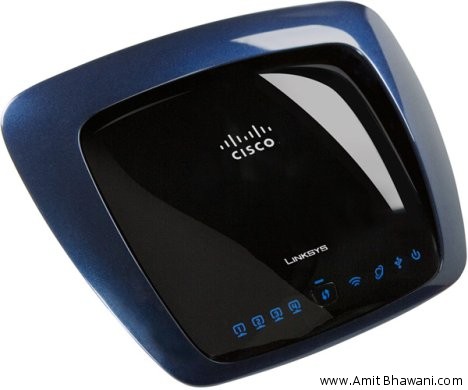
Linksys WRT 610N RouterLinksys WRT 610N Router

Linksys WRT 610N RouterAs you see in the image of Linksys WRT 610N it doesn’t have any antenna so you can’t adjust the router for the best speed and range and it would be going with the environment that you have. It doesn’t have multiple internal antennas for mechanized better performance but can’t be tweaked. This product from Linksys is a Dual N Band support and so it’s priced that high. It has got a radio antenna which helps in transmissions and reception of Wi Fi signals both ways at together over the 2.4 GHz and 5 GHz band.
Apart from that as usual it has got four LAN ports and 1 USB port for sharing storage like external HD drive or pen drive. Coming to features like Wi Fi protection, Wireless repeater, Dynamic DNS updating, Firmware upgraded and compact design makes this router a worth of its money value priced at Rs 10,999.

Netgear WNDR3700

Netgear WNDR3700 Wireless RouterNetgear WNDR3700 from the front is a Dual Band Wireless N router with considerable amount of features. As usual its supports four Gigabit LAN connections and it includes USB pin for the provisions of mass storage of media or files which can be shared within the network of your home. The wireless network can reach a top speed of 300 Mbps and it has got 5 GHz of radio band.
As you see the router it has LED’s placed at the front panel when the router is powered ON. It has got internal antenna which limits users from setting up reception manually. It has got a dedicated button to start or stop WiFi protected setup connection and a button to enable or disable wireless connectivity. Apart from that it has the required functions like Wireless repeater, Dynamic DNS updating, Firmware upgraded. It has also got stand for horizontal and vertical operations.
This product from NetGear is priced at Rs 9900.

Linksys WRH54G Wireless-G Home Router

Linksys WRH54G Wireless-G Home RouterLinksys WRH54G is a wireless G Home Router which is designed for each internet sharing for both wireless and wired devices. It has got four Ethernet port for the direct LAN connection to four PCs. And as you know you can connect up to unlimited wireless connections through Wi Fi. It comes with Wireless security and firewall protection designed to safeguard your network and computer from internet attacks. It has got an adjustable antenna so that you do manual settings on the web when you don’t get the proper signals.
The Linksys WRH54G comes with a Wi Fi protected Access (WPA2), WEP and wireless MAC Filtering. It’s provided with User Guide on CD Rom. This wireless G Home router is best suitable for home purpose and its comes with affordable price tag of Rs 2750.

Belkin N600 Wireless Dual Band N+ Router

Belkin B600As you know that Dual Band N technology gives you the faster and reliable speed for video and music, the Belkin N600 Dual Band N+ router is the right choice for home Wi-Fi setup with dual concurrent radio bands of 2.4 GHz and 5 GHz.
Its supports WPA, WPA Personal and WEP encryption for 64 bit and 128 bit. With the easy setup Wi Fi you can connect up to 16 maximum connections. With the provided 1 USB connection you share hard drive space, printer sharing, file sharing and remote server with this Dual Band N+ Router.

Linksys Wireless-G Wag200g Router

Linksys Wireless-G Wag200g RouterLinksys Wireless-G Wag200g model router is the best suitable all in one solution for wireless internet connectivity at home. It promises to give you amazing fast internet connection speed faster than dial-up speed.
As usual like other wireless modem it has got 4 ports for Ethernet connections to PC directly through LAN cables or extent to many PCs using Switch or hub. With a provided USB Port you can share a multiple things like printer, hard drive space, share files and other resources. The built-in Wireless G Access point can allow up to 32 wireless devices and you can connect your mobile phone, iPad or PC or any other device which has Wi Fi access. As expected like other wireless modem you are provided with advanced firewall, WPA2 encryption. The setup is very easy and we wrote about default set up of Linksys routers too.
The WAG200G model of Linksys is priced at Rs 6500.

iBall Baton 150m Wireless N Router

iball Wireless Routeriball Wireless Routeriball Wireless RouterIf you just need wireless setup at home with no other Ethernet cable provision, then you can go with iBall Baton 150m with a very affordable price tag of it. As a wireless device, you can use the incoming connection into wireless transmissions on internet through multiple devices.
Apart from being just a dedicated wireless router for Wi Fi, it come with few features like WPS for Wi Fi protection setup, you can set up security by Push Button configuration (PBC) and through PIN method. It also supports WPA, WPA2 data security, Wildcard filtering, Domain filtering, URL limit restriction, virtual server support and comes with an easy setup with a total of 3 years warranty on it.
With the built-in NAT and DHCP servers, it supports static IP address distributing and this product is priced not more than Rs 1700 in the market.

Zyxel NBG 417N Wireless N Router

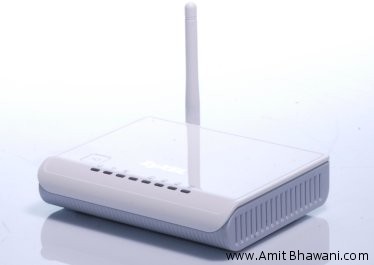
Zyxel NBG 417N RouterZyxel brings the budget wireless router in the market with the NBG 417N model. A simple design with white colored body can be an easy setup for home Wi-Fi. As usual like the other Wireless N routers it’s provided with 4 Ethernet ports. It operates at 2.4 GHz radio spectrum.
Among the other features from being able to connect multiple Wi-Fi devices with 150 Mbps standard, it provides with Wi Fi protected standards and thus have WPS button and bandwidth management through QoS. Zyxel provides a limited three years warranty on it with a price tag of Rs 3,000 attached to it.

Best Amazon S3 Clients, Tools & Plugins for Windows Mac & LinuX


Amazon S3 logoAmazon S3 is the affordable cloud storage services by Amazon which allows you to host, store and retrieve any amount of data. It can be used as the online backup for hosting the static content like images, videos files, Flash videos, pictures and audio files, etc. The data that you store at Amazon S3 can be retrieved from anywhere at any point of time.
Accessing and management of the S3 account is not simple as its looks to you. Below is the list of Amazon S3 tools mostly from the third-party developers which can assist in managing your S3 account on Windows, Mac and Linux PCs –
S3 Browser
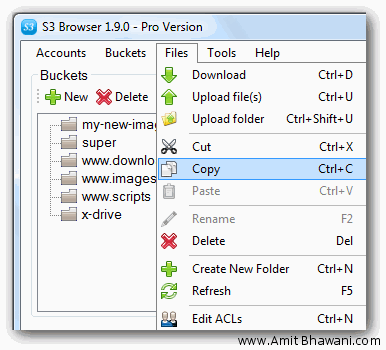
S3 BrowserThe S3 browsers a freeware applications designed for Windows PC users for providing a simple web service interface and help you manage your work very easily. With S3 browser you can upload or download files from Amazon S3, publish content easily, you can browse, create, delete Amazon S3 buckets easily, share your S3 Buckets with other users, set access control on buckets and files, moving files from one S3 account to another. With S3 browser you can access multiple Amazon S3 Accounts. Moreover S3 browser comes in a portable version and the program is free to use for personal purpose.
S3Sync
S3Sync application will directly transfers directories between the local directories and S3 bucket. S3Sync tool can be use in Windows environment as well as the Linux environment too.
Cross FTP
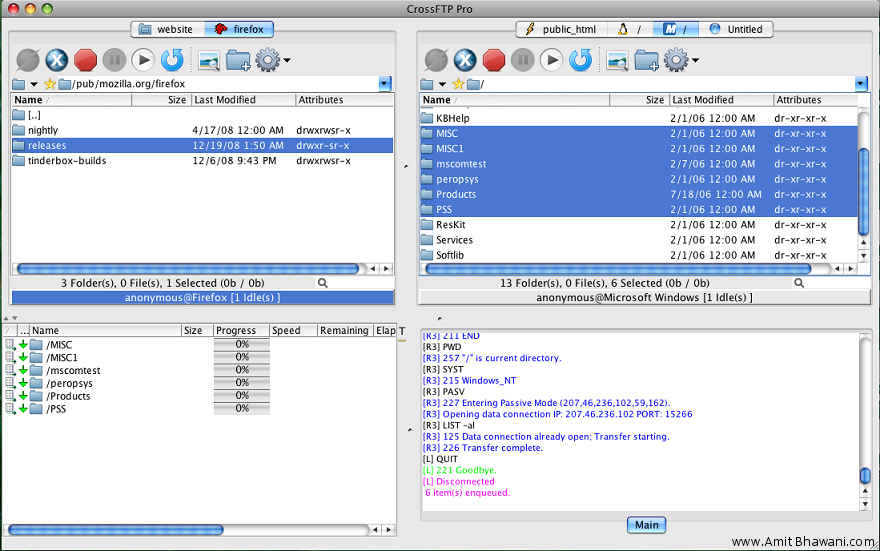
Cross FTPCross FTP is a File Transfer Protocol program just like the other FTP program that we have. Cross FTP is much reliable FTP Silent supporting FXP, SFTP, WebDav, MobileMe iDisk, and Amazon S3. It runs inside your web browser without installation. Just like the normal FTP you can create buckets, set access control on them, change the CloudFront distribution settings of files, download files, modify multiple or single files, uploads, downloads, backups, metadata modifications, schedules, and synchronize S3, put upload files in que and lot more options.
S3 for Live Writer
For bloggers who have blog at Windows Live Writer then you can use Amazon S3 for hosting your files and it can come handy. When you are in at Windows Live Writer this application will allows you to upload documents and other files to your existing S3 account and insert the link to your blog posts.
CloudBerry Explorer
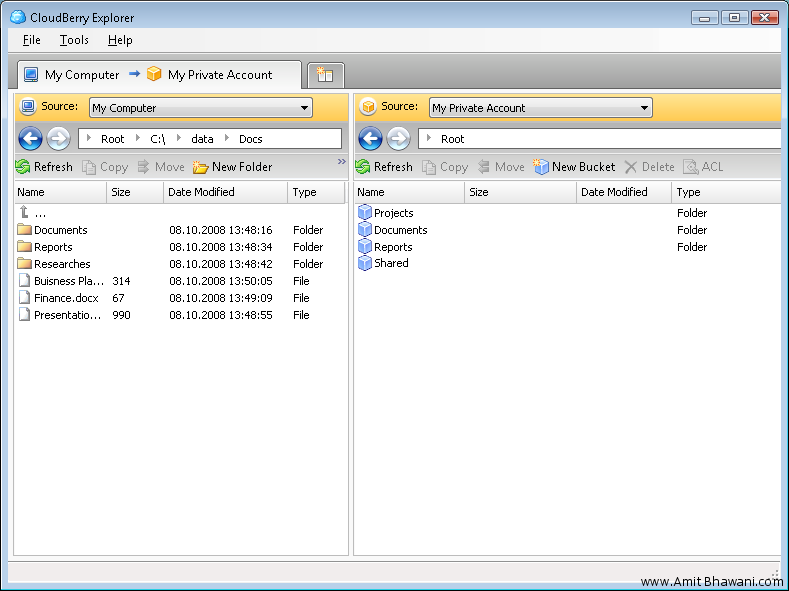
cloudberry explorerWith CloudBerry you can connect multiple S3 accounts simultaneously. The multiple accounts connections are shown in separate tabs for each account just like tab browsing in browser. Not only that have a wide variety of options like track bucket login activity, file permissions control and delete temporary files, drag and drop uploading/downloading. The CloudBerry interface is just the like the FTP software. This is a better free alternative to the existing JungleDisk which charges you fee for every upload.
S3Fox Organizer
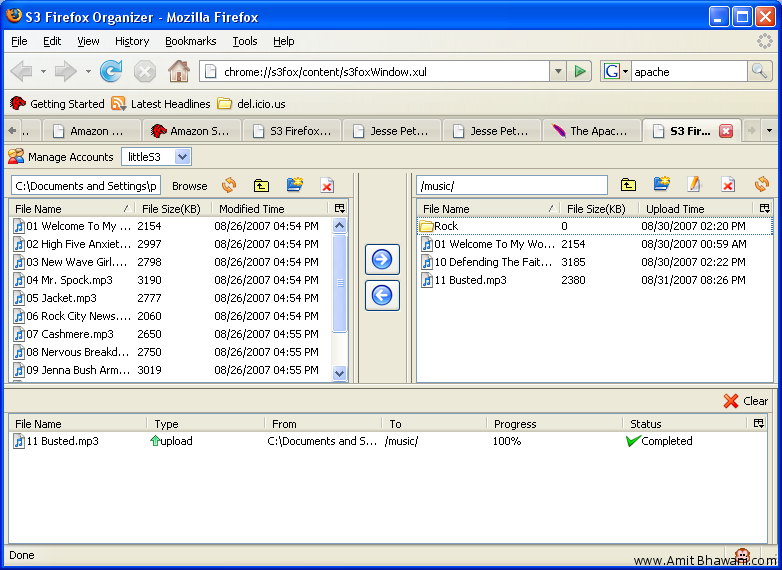
S3 Firefox OrganizerThe S3Fox Organizer is a front end tool for Amazon S3 with a GUI interface used to organize your S3 account files. It opens the Amazon S3 files in Firefox browser like tabs and looks much like that of a FTP client with dual pane layout. Just like normal FTP client its displays the files on Computer on left and the files on Amazon S3 on the right pane. It works for Windows, Linux and Mac users and wherever Firefox installs. With it you can synchronize folders with local system and S3, Drag and drop upload of files, access to multiple accounts for each site. With S3Fox you can easily set permissions/Access control to buckets or files and you can easily manage the S3CloudFront.
Transmit
TransmitA known FTP clients which allows S3 users to upload, download and organize your online Amazon S3 storage for Mac users. The latest versions Transmit 4 offers a variety of options like adding custom icons to your favourites, skip files automatically, customize your favourite view, quickly copy a webpage URL, navigate in both side simultaneously, quickly add Zip files and customize keyboard shortcuts. It also adds drag and drop trick so that you can easily add files to the folder.
WordPress Plugin
Amazon S3 can also be used to store the WordPress files in secure way. This plugin allows you to quickly add images, videos, media and attachments that you are uploading to your WordPress blog to automatically upload on to your Amazon S3 bucket. Furthermore it also adds an Amazon S3 interface to WordPress blogs which allows browsing the S3 files for usage whenever required. The plug can set the HTTP expiration header of your blog images to a future date.
Bucket Explorer
Bucket ExplorerBucket Explorer is a paid application available for Mac, Windows and Linux which allows you to perform S3 operations from the desktop. The Bucket Explorer has a very good options of schedule and automate uploads, downloads and not to forgets it provides you with a backup where your deleted items are stored, so that you can recover it if you want in future. With all the options present Bucket Explorer is best front ends app for users.
S3Anywhere
S3AnywhereS3Anywhere is an Amazon S3 file manager application available for Android users as app at Android market place. With your mobile you can manage most of the things with your Amazon S3 account. The features like downloading, uploading from your mobile, renaming, deleting, and copying of files, ACL file permissions and lot more other which can be performed from your Android mobile. The recent development also includes S3Anywhere app for your manage S3 account from the Android tablet devices.
S3 Bucket Master
S3 Bucket Master is again an Amazon S3 management tool. Its supports creating, deleting buckets, browsing stored keys, uploading and downloading with encryption and compressions and managing Access control lists.
Flickr to S3 Backup Tool
As the title suggest, you can now easily backup your Flickr photo to your Amazon S3 account with small backup application. Nice and easy if you want to take backup of Flickr photos to more secure servers.
Open S3
Open S3 allows you to synchronize your S3 files on iPhone or iPod Touch and edit your office documents like (Word, Powerpoint and Excel) through Zoho office. You can also view your PDF’s, photos, share files and collaborate using business groups easily.
Bucket Upload
With this application for Nokia N Series mobile phones, it allows you to upload your files to Amazon S3 account with a list of other features like uploading, downloading, renaming and modify an S3 account settings.
Amazon S3 File ManagerAmazon S3 Image File Manager
Amazon S34 Image Manager is a free tool which allows you to add files with a simple drag and drop to your S3 account. With the advanced image manager you can modify, delete, add, and remove, bulk edit image files at once.
S3 Drive
With this application you can access your S3 drive as a normal hard drive on your computer. It supports Windows operating system and it’s quite useful.

Meet The Author